RabbitRun Technologies Inc.
Small Business SD-WAN
  • Home
  • Platform
  • Products
  • Solutions
  • Partner with Us
  • About Us
  • News
  • Contact Us
RabbitRun
  • Home
  • Platform
  • Products
  • Solutions
  • Partner with Us
  • About Us
  • News
  • Contact Us
Select Page

How do I enable the Remote Access Server Feature?

Jun 10, 2024

a

How do I enable the Remote Access Server Feature?

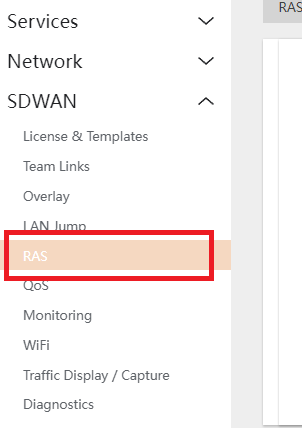
  1. Navigate to SDWAN > RAS.
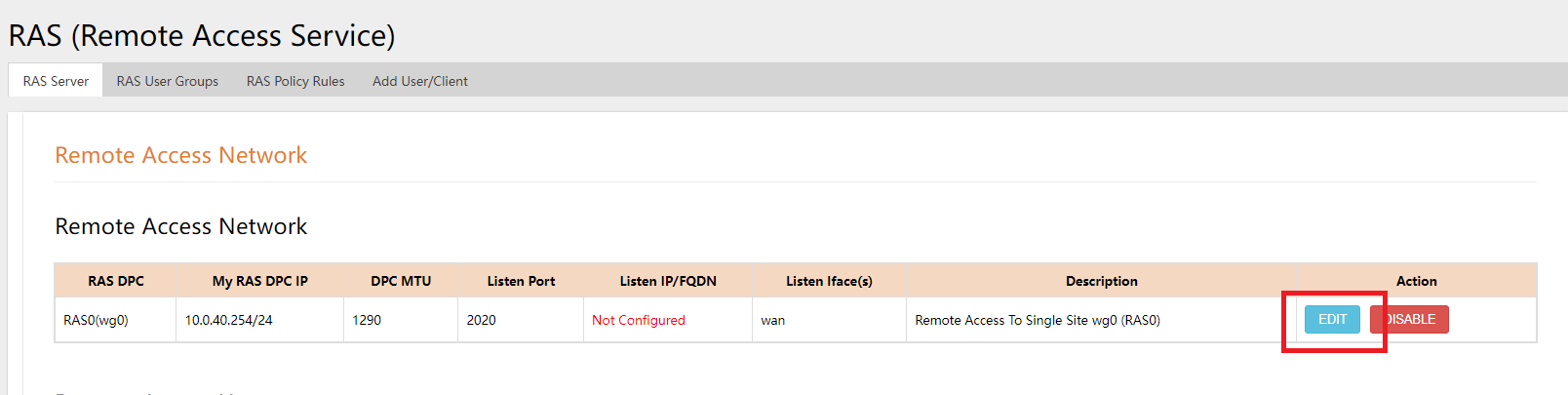
  2. Under RAS SERVER TAB, click on the EDIT button.
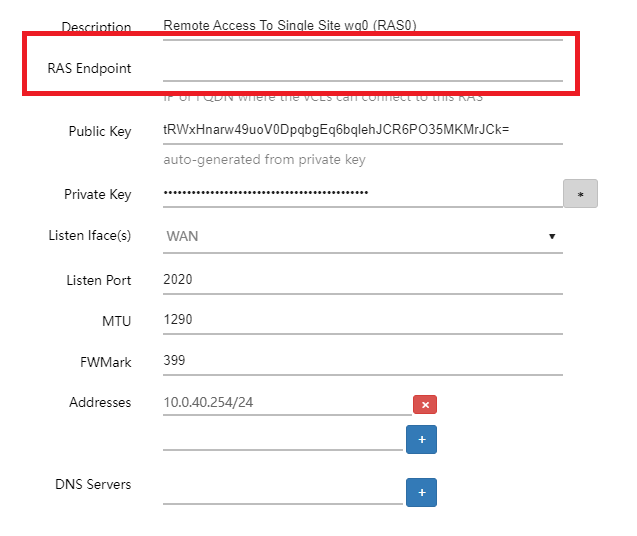
  3. Add the PUBLIC STATIC IP or DMZ IP in the RAS ENDPOINT field.
  4. Click on SAVE to setup the Server.
Back to Top

More blogs

  • RabbitRun-Joins-Crexendo-EVP-Program-2026
  • Why POTS Replacement Solutions Need SD-WAN and Cybersecurity
  • Beyond Internet Backup
  • SMBs Save on Cyber Insurance with SD-WAN + Cybersecurity
  • Cybersecurity Made Simple for SMBs

Our mission is to keep businesses connected, protected, productive, and operational, delivering enterprise level continuity as one managed service.

Quick Links

  • Small Business SD WAN, Cellular Failover & Cybersecurity | RabbitRun
  • Multi-Carrier Cellular Backup for Business | RabbitRun
  • Managed SD-WAN as a Service for Small Business | RabbitRun
  • Monthly Licensed SD WAN Routers & Plans | Flexible Solutions by RabbitRun
  • Solution-Implementations
  • Partner-With-RabbitRun

Contact Us

1-855-572-2248
info@rabbit.run
10, 225 The East Mall Suite 1207 Etobicoke, ON M9B 0A9

Follow Us

  • Follow
  • Follow
  • Follow
  • Follow

All Rights Reserved © 2026 RabbitRun Technologies Inc